Move an arm through multiple waypoints
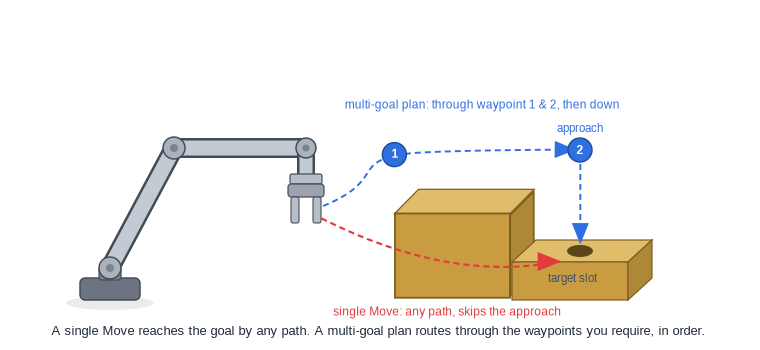
Sometimes you need the arm to pass through a specific approach point before
reaching a target, to thread between two pieces of equipment in a set order,
or to follow a sequence of stations in one motion. A single Move to the final
pose lets the planner choose any collision-free path, which may skip the intermediate
poses you care about.
armplanning.PlanMotion accepts an ordered list of goals and plans one
continuous trajectory that hits each in turn. This page shows how to build a
multi-goal request, mix goal types across waypoints, recover a partial
result when a later waypoint is infeasible, and plan a sequence of separate
requests that run back to back.
Go SDK only
Routing one plan through multiple goals uses armplanning.PlanMotion, an
in-process Go function. The motion service Move API takes a single
destination, so multi-waypoint planning runs in Go alongside the planner rather
than over the service API. For the difference between planning in process and
calling the service, see Verify a motion plan.
Prerequisites
- A running machine with an arm component configured.
- A frame system configured for the arm.
- A Go program or module that imports the RDK. Planning runs in-process, not over the service API.
Why route through ordered goals
One multi-goal plan differs from chaining separate Move calls:
- Each
Moveplans and executes independently, so the arm stops at every waypoint instead of flowing through it. - Each call plans from scratch with no knowledge of the goals that follow, so it can reach a waypoint in a configuration that makes the next one unreachable.
- There is no single trajectory you can inspect, validate, or replay.
A multi-goal PlanRequest produces one trajectory spanning every segment. The
planner hits each goal in the order you list it, and uses each waypoint’s solved
configuration as the start of the next segment, so the whole motion is
continuous and consistent.
Build a multi-goal PlanRequest
PlanRequest.Goals is an ordered list of PlanState values. Each PlanState
is either a set of Cartesian poses (FrameSystemPoses) or a joint configuration
(FrameSystemInputs), and you can mix the two across waypoints. The
StartState gives the configuration the plan begins from.
import (
    "go.viam.com/rdk/motionplan/armplanning"
    "go.viam.com/rdk/referenceframe"
    "go.viam.com/rdk/spatialmath"
    "github.com/golang/geo/r3"
)

// Build the frame system from the running machine.
fsCfg, err := machine.FrameSystemConfig(ctx)
if err != nil {
    logger.Fatal(err)
}

// Assemble the configured parts into a frame system the planner can use.
fs, err := referenceframe.NewFrameSystem("robot", fsCfg.Parts, nil)
if err != nil {
    logger.Fatal(err)
}

// The start state is required and cannot be nil. To plan from where the arm is
// now, read its current joints with arm.JointPositions and use those here.
startState := armplanning.NewPlanState(nil, referenceframe.FrameSystemInputs{
    "my-arm": []referenceframe.Input{0, 0, 0, 0, 0, 0},
})

goals := []*armplanning.PlanState{
    // Waypoint 1: a Cartesian approach pose for the gripper.
    armplanning.NewPlanState(referenceframe.FrameSystemPoses{
        "my-gripper": referenceframe.NewPoseInFrame("world",
            spatialmath.NewPose(
                r3.Vector{X: 400, Y: 0, Z: 300},
                &spatialmath.OrientationVectorDegrees{OZ: -1},
            )),
    }, nil),
    // Waypoint 2: a specific joint configuration.
    armplanning.NewPlanState(nil, referenceframe.FrameSystemInputs{
        "my-arm": []referenceframe.Input{0, -1, 1, 0, 1, 0},
    }),
    // Waypoint 3: a relaxed goal expressed as a pose cloud.
    armplanning.NewPlanState(referenceframe.FrameSystemPoses{
        "my-gripper": referenceframe.NewPoseInFrameWithGoalCloud("world",
            spatialmath.NewPose(
                r3.Vector{X: 350, Y: 200, Z: 250},
                &spatialmath.OrientationVectorDegrees{OZ: -1},
            ),
            &referenceframe.PoseCloud{X: 5, Y: 5, Z: 5, Theta: 10}),
    }, nil),
}

// second return is plan metadata
plan, _, err := armplanning.PlanMotion(ctx, logger, &armplanning.PlanRequest{
    FrameSystem: fs,
    StartState:  startState,
    Goals:       goals,
})
if err != nil {
    logger.Fatal(err)
}
Each goal names the frame it constrains, so a Cartesian waypoint can target the gripper frame while a configuration waypoint pins the arm’s joints. Pose clouds work as goals too, which lets you relax the waypoints where close enough is fine. See Pose clouds for when to use them.
A configuration waypoint must keep every joint within its
joint limits. Since RDK
v1.17.0, PlanMotion returns an error before it plans if one doesn’t, naming
the goal, frame, joint, value, and limits.
Read the trajectory
The returned Plan is one continuous trajectory across all segments.
plan.Trajectory() is a slice of joint configurations, one per step, from the
start state through the last goal:
for i, step := range plan.Trajectory() {
    fmt.Printf("step %d: %v\n", i, step["my-arm"])
}
There is no break in the trajectory at a waypoint: the steps that reach
waypoint 1 flow directly into the steps that leave it for waypoint 2. This is
the property you lose when you chain separate Move calls, where each call is
its own plan with a full stop in between.
Recover a partial plan when a waypoint fails
If a later waypoint is unreachable, the whole request fails by default and you
get no trajectory, even for the waypoints that did solve. Set
ReturnPartialPlan to get the trajectory up to the last waypoint the planner
solved:
opts := armplanning.NewBasicPlannerOptions()
opts.ReturnPartialPlan = true

plan, _, err := armplanning.PlanMotion(ctx, logger, &armplanning.PlanRequest{
    FrameSystem:    fs,
    StartState:     startState,
    Goals:          goals,
    PlannerOptions: opts,
})
The partial trajectory ends at the last solved waypoint, which tells you which waypoint is infeasible: if a three-goal request returns a plan that stops at waypoint 2, waypoint 3 is the one to investigate. From there, loosen that waypoint (for example with a pose cloud), move it, or check that it is reachable and collision-free.
Plan a sequence of requests
A multi-goal PlanMotion request uses one set of obstacles, constraints, and
planner options for every waypoint. When each move needs its own request, for
example different obstacles after the gripper picks something up, but the moves
still run back to back, use armplanning.PlanMotionSequence. It plans a list of
PlanRequests in order and returns one plan and one PlanMeta per request:
requests := []*armplanning.PlanRequest{
    {FrameSystem: fs, StartState: startState, Goals: []*armplanning.PlanState{pickGoal}},
    {FrameSystem: fs, Goals: []*armplanning.PlanState{placeGoal}, ObstaclesInWorldFrame: obstaclesWhileHolding},
}

// nil uses armplanning.NewDefaultSequenceOptions()
plans, metas, err := armplanning.PlanMotionSequence(ctx, logger, requests, nil)
if err != nil {
    logger.Fatal(err)
}
Only the first request’s StartState is used. Each later request starts from
the configuration the previous plan ended in, and PlanMotionSequence
overwrites its StartState, so don’t reuse the requests for another call.
If a request can’t be planned from where the previous plan ended,
PlanMotionSequence backtracks: it plans the earlier request again with that
ending ruled out, then continues from the new ending.
SequenceOptions.BacktrackBranchFactor sets how many endings of a request it
tries from one start state before it backs up another request. The default is
3, and values below 1 return an error. The search grows exponentially with how
far it backs up. Each request’s PlanMeta counts its re-plans in
BacktrackCounter and lists the endings it ruled out in RejectedSolutions.
Each request plans with ReturnPartialPlan turned off, so a request that only
partly plans counts as a failure and the search backtracks. If the context is
canceled or times out, PlanMotionSequence stops and returns an error that
wraps ctx.Err(), for example
stopped before planning request 2/3: context deadline exceeded.
An error otherwise means no combination of plans was found.
PlanMotionSequence takes the opts argument since RDK v1.17.0.
What’s next
- Pose clouds: relax a waypoint into a region of acceptable poses.
- Verify a motion plan: plan without executing to check feasibility first.
- How motion planning works: why a goal can be infeasible and what to try.
Was this page helpful?
Glad to hear it! If you have any other feedback please let us know:
We're sorry about that. To help us improve, please tell us what we can do better:
Thank you!